


 Brand Brand | Microsoft |
|---|---|
 License Type License Type | Retail |
 Delivery Delivery | Instant Delivery |
What you get
After payment you receive your 25-character Windows 11 Pro product key by email, instantly in most cases (a system delay can occasionally add 5–10 minutes). The email includes the link to Microsoft’s official download and our step-by-step activation guide, and the key is also saved under My Account → Keys.
What is Windows 11 Pro?
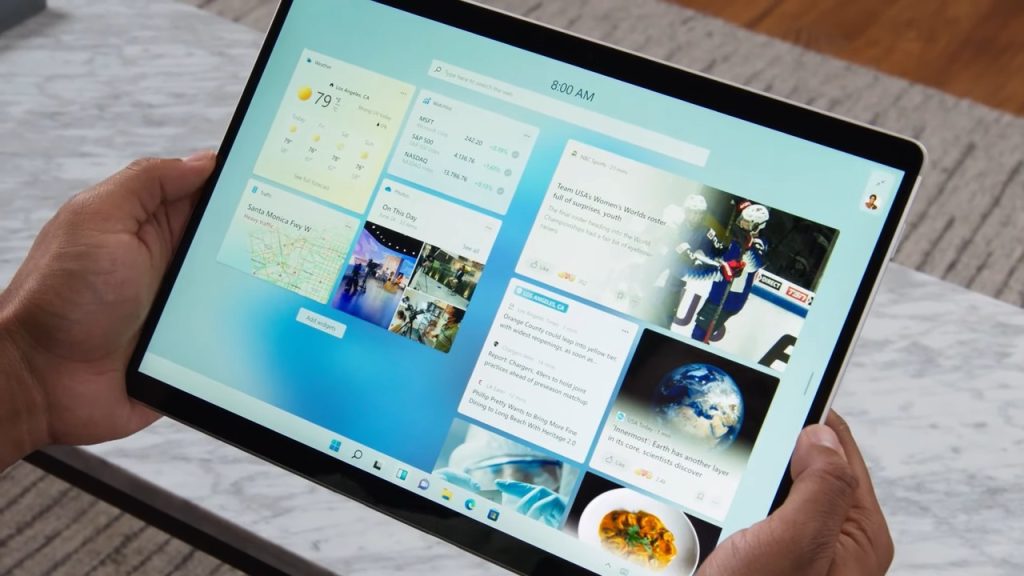
Windows 11 Pro is the business edition of Windows 11. It has everything in Windows 11 Home, plus tools for work and security:
- BitLocker drive encryption
- Remote Desktop, so you can connect to this PC from another device
- Hyper-V virtual machines and Windows Sandbox
- Group Policy and joining a company domain or Microsoft Entra ID
License and activation
This is a retail Windows 11 Pro key for one PC. It activates online, once, on the PC where you enter it. You can reinstall Windows on that same PC as long as its hardware doesn’t change, but the key can’t be moved to another computer. The key is for Windows 11 only: it doesn’t activate Windows 10.
Is it genuine? Why is it cheaper than Microsoft’s price?
Yes. It’s a genuine Microsoft key that activates on Microsoft’s own activation servers. We buy unused keys from companies that purchase Microsoft licenses in large batches and have more than they need. We get that surplus for a fraction of the retail price and pass the saving on to you.
We state the license type, activation method and device limit before you buy, and the key you receive is exactly the one described: a retail Windows 11 Pro key for one PC, activated online.
How to activate Windows 11 Pro
Already running Windows 11 Home or Pro?
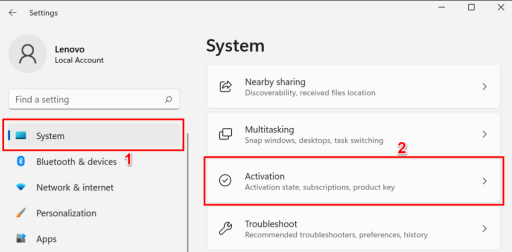
- Open Settings > System > Activation.
- Click Change product key and enter the 25-character key from your email.
- Windows activates online. If you had Windows 11 Home, it upgrades to Pro and restarts; your files and apps stay.
Installing Windows 11 from scratch?
- Download Microsoft’s Media Creation Tool and create a bootable USB stick (8 GB or larger).
- Start the PC from the USB stick and follow the setup.
- When setup asks for a product key, enter yours and it installs Windows 11 Pro. You can also choose “I don’t have a product key”, pick Windows 11 Pro from the list and activate later in Settings > System > Activation.
If your PC came with Windows 11 Home, setup may install Home without asking, because it reads the Home key stored in the PC’s firmware. That’s fine: finish setup, then upgrade to Pro with your key as described above.
If activation fails
- “This product key didn’t work”: check that you’re activating Windows 11 (not Windows 10) and that you typed the key exactly as in the email.
- No internet connection: Windows activates online, so connect the PC and enter the key again.
- Anything else: contact us within 15 days of your order, on live chat or at support@cheapkeys.io. We’ll fix it or replace the key, and if no working solution is possible, you get a refund under our refund policy.
Windows 11 Pro or Windows 11 Home?
| Windows 11 Home | Windows 11 Pro | |
|---|---|---|
| Everyday use, Microsoft Store, Edge | Yes | Yes |
| BitLocker drive encryption | No (device encryption only) | Yes |
| Remote Desktop host | No | Yes |
| Hyper-V and Windows Sandbox | No | Yes |
| Group Policy and domain join | No | Yes |
| Upgrade | To Pro with a Pro key | – |
For home use at a lower price, see Windows 11 Home. For several computers, see Windows 11 Pro (5 PCs).
System requirements
- Processor: 1 GHz or faster with 2 or more cores, on a compatible 64-bit processor
- Memory: 4 GB RAM
- Storage: 64 GB or more
- Firmware: UEFI with Secure Boot
- TPM: Trusted Platform Module 2.0
- Graphics: DirectX 12 compatible, with a WDDM 2.0 driver
- Display: 720p, larger than 9 inches
Not sure your PC qualifies? Check our Windows 11 system requirements guide.
Specifications
| Product | Microsoft Windows 11 Pro |
|---|---|
| License type | Retail, one PC |
| Activation | Online, once. Reinstall on the same PC; not transferable to another PC |
| Upgrade | Upgrades Windows 11 Home to Pro |
| Architecture | 64-bit |
| Delivery | Instant, by email and under My Account → Keys |
Frequently asked questions
Can I upgrade Windows 11 Home to Pro with this key?
Yes. Enter it in Settings > System > Activation > Change product key. Windows upgrades to Pro and keeps your files and apps.
Does it work for Windows 10?
No. This key activates Windows 11 Pro only. For Windows 10, see Windows 10 Pro.
Can I reinstall Windows later?
Yes, on the same PC, as long as the hardware doesn’t change.
Can I move it to a new computer?
No. The key activates once, on one PC. A new computer needs a new key.
Is it a subscription?
No. You pay once and keep using it.
Where do I download Windows 11?
From Microsoft’s official website, with the Media Creation Tool. The link is in your email.
How fast is delivery?
Instant in most cases, by email and under My Account → Keys. A system delay can occasionally add 5–10 minutes.
What if my key doesn’t work?
Contact us within 15 days of your order. We fix it or replace the key, or refund you if no working solution is possible.
 Overview

| Brand | Microsoft |
|---|---|
| License Type | Retail |
| Delivery | Instant Delivery |
Related Products


Windows 10 Pro 5-PC Key
70.66 $
Windows Server 2019 Datacenter Key
150.20 $

Days Gone CD Key
37.09 $
Project 2016 Professional Key
15.89 $More Like This

Thom van Goethem (verified owner) –
the best website to buy windows 11 pro cd key, the best price for original license and the delivery is instant. Previously I have purchased win 10 pro cd key but now upgraded to win 11. I am very satisfied, will buy office package in the next month, thank you.
Verified owner tylerleonard9190 (verified owner) –
Just activated my Windows 11 Professional key and the installation was super easy!
Verified owner frantiek64 (verified owner) –
I recently purchased a Windows 11 Professional key from this website and I must say, the experience was exceptional. The customer support team was extremely helpful, guiding me through the process with patience and expertise. I was impressed by how quickly I received my windows 11 product key. Highly recommended for anyone in need of reliable software support and fast service!
Patrick Tal (verified owner) –
found your website on google, you have great deal for an original win 11 pro license, good job and thank you.